Designing Volunteer connect
As I was selected to join the community seat programme at Brainstation for their UX Design course, I was required to create a highly usable and functional design solution for a digital experience.
A Volunteer app connecting volunteers and organisations.
As I was selected to join the community seat programme at Brainstation for their UX Design course, I was required to create an end to end highly usable and functional design solution for a digital experience.
The duration of this was 4 weeks, and the tools used were Figma for the wireframes and prototyping, Figjam for the task flows and Relume.io for the sitemap.
Problem statement
Many would-be volunteers struggle to find suitable opportunities, while organisations struggle to attract reliable ones. The goal is to bridge this gap by simplifying the connection between both sides.
Literature review
Conducting secondary research reaffirmed to me that there's validity in terms of what I am trying to find out with this case study.
• Problems in sustaining a ready supply of volunteers have surfaced and accelerated over the past decade (Brudney and Meijs 2009)
• Volunteers often seek meaningful engagement where their contributions align with their skills, values, and availability (Clary et al., 1998)
• User reviews and organisational ratings on platforms can foster trust and transparency, addressing concerns volunteers often have when selecting opportunities (Musick & Wilson, 2008).
Websites:
Brudney, J. L., & Meijs, L. C. P. M. (2009). It ain’t natural: Toward a new (natural) resource conceptualization for volunteer management. Nonprofit and Voluntary Sector Quarterly, 38(4), 564–581.
Clary, E. G., Snyder, M., & Stukas, A. A. (1998). Volunteers’ motivations: Findings from a national survey. Nonprofit and Voluntary Sector Quarterly, 27(4), 485–505.
Musick, M. A., & Wilson, J. (2008). Volunteers: A social profile. Indiana University Press.
Penner, L. A. (2002). Dispositional and structural determinants of volunteerism. Journal of Personality and Social Psychology, 82(1), 118–131.
Conducting secondary research reaffirmed to me that there's validity in terms of what I am trying to find out with this case study.
• Problems in sustaining a ready supply of volunteers have surfaced and accelerated over the past decade (Brudney and Meijs 2009)
• Volunteers often seek meaningful engagement where their contributions align with their skills, values, and availability (Clary et al., 1998)
• User reviews and organisational ratings on platforms can foster trust and transparency, addressing concerns volunteers often have when selecting opportunities (Musick & Wilson, 2008).
Websites:
Brudney, J. L., & Meijs, L. C. P. M. (2009). It ain’t natural: Toward a new (natural) resource conceptualization for volunteer management. Nonprofit and Voluntary Sector Quarterly, 38(4), 564–581.
Clary, E. G., Snyder, M., & Stukas, A. A. (1998). Volunteers’ motivations: Findings from a national survey. Nonprofit and Voluntary Sector Quarterly, 27(4), 485–505.
Musick, M. A., & Wilson, J. (2008). Volunteers: A social profile. Indiana University Press.
Penner, L. A. (2002). Dispositional and structural determinants of volunteerism. Journal of Personality and Social Psychology, 82(1), 118–131.
Affinity Map
I had conducted interviews with 3 participants all varying in age (27-60) and volunteer experience. Affinity mapping really helped organise the different interviews to understand the similar patterns, insights, and user needs to make sure "Volunteer connect" can be as useful as possible. These were the 3 key themes that they all had in common based on their interviews.
• Volunteers are driven by purpose, impact, and alignment with personal values or interests.
• Volunteers prefer convenient, local opportunities that minimise travel friction.
• Trust in the organisation and role clarity is crucial for volunteers to commit.
I had conducted interviews with 3 participants all varying in age (27-60) and volunteer experience. Affinity mapping really helped organise the different interviews to understand the similar patterns, insights, and user needs to make sure "Volunteer connect" can be as useful as possible. These were the 3 key themes that they all had in common based on their interviews.
• Volunteers are driven by purpose, impact, and alignment with personal values or interests.
• Volunteers prefer convenient, local opportunities that minimise travel friction.
• Trust in the organisation and role clarity is crucial for volunteers to commit.
I had conducted interviews with 3 participants all varying in age (27-60) and volunteer experience. Affinity mapping really helped organise the different interviews to understand the similar patterns, insights, and user needs to make sure "Volunteer connect" can be as useful as possible. These were the 3 key themes that they all had in common based on their interviews.
• Volunteers are driven by purpose, impact, and alignment with personal values or interests.
• Volunteers prefer convenient, local opportunities that minimise travel friction.
• Trust in the organisation and role clarity is crucial for volunteers to commit.
User personas
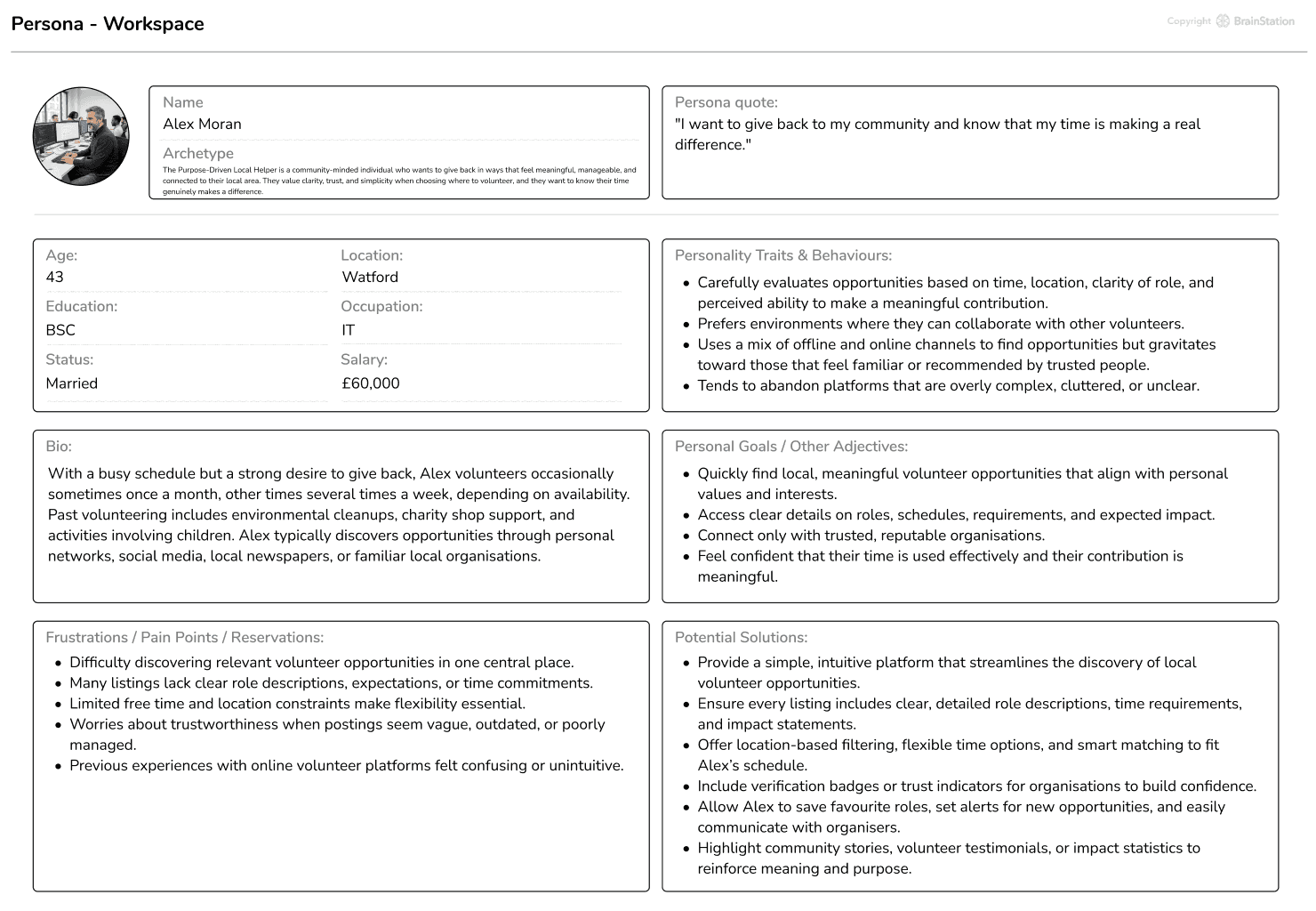
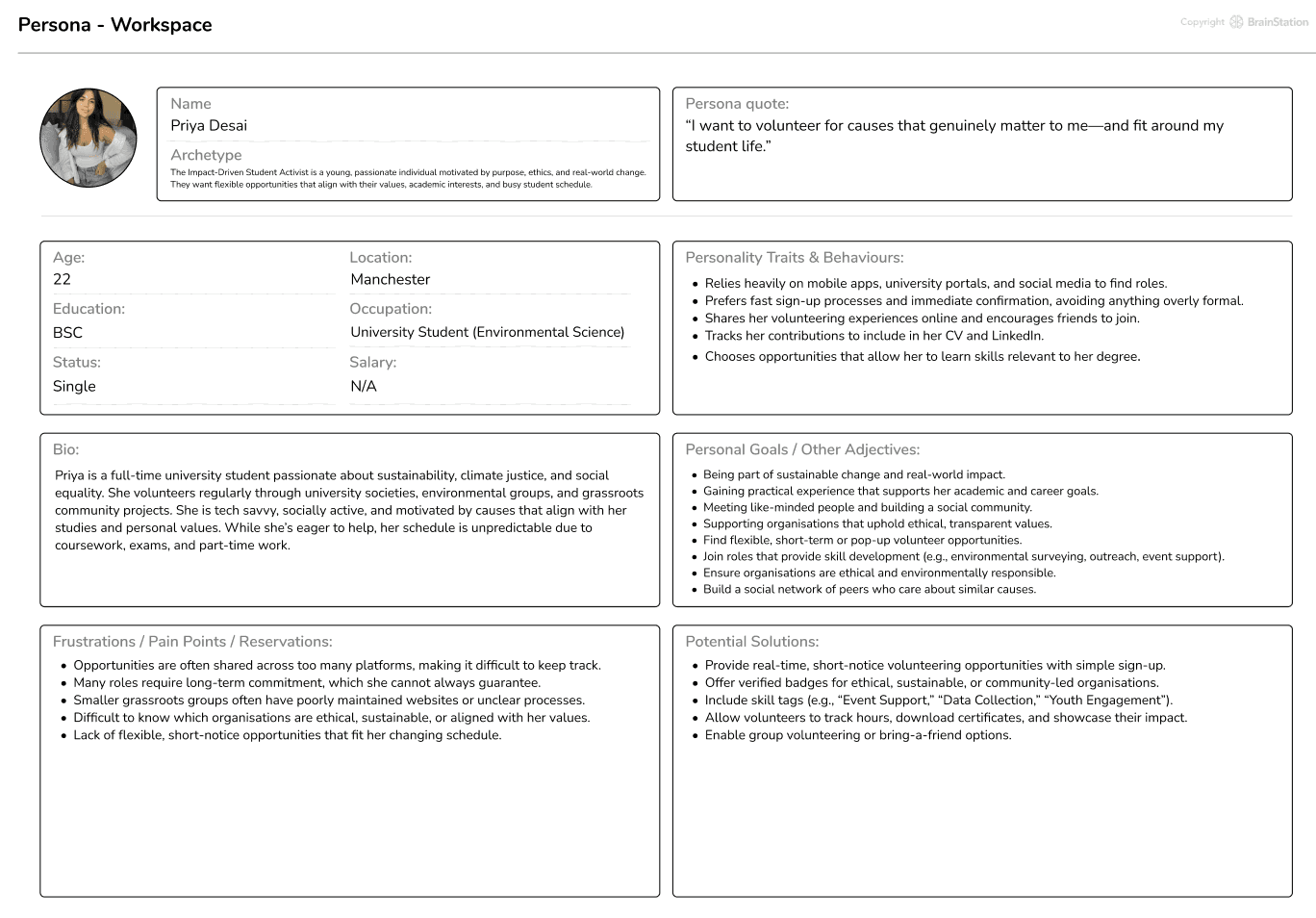
Affinity mapping really made creating the user personas very easy, these 2 user personas showcase 2 potential users and 2 key user types.
These 2 user personas showcase 2 potential users and 2 key user types.
Affinity mapping really made creating the user personas very easy, these 2 user personas showcase 2 potential users and 2 key user types.
Competition Analysis
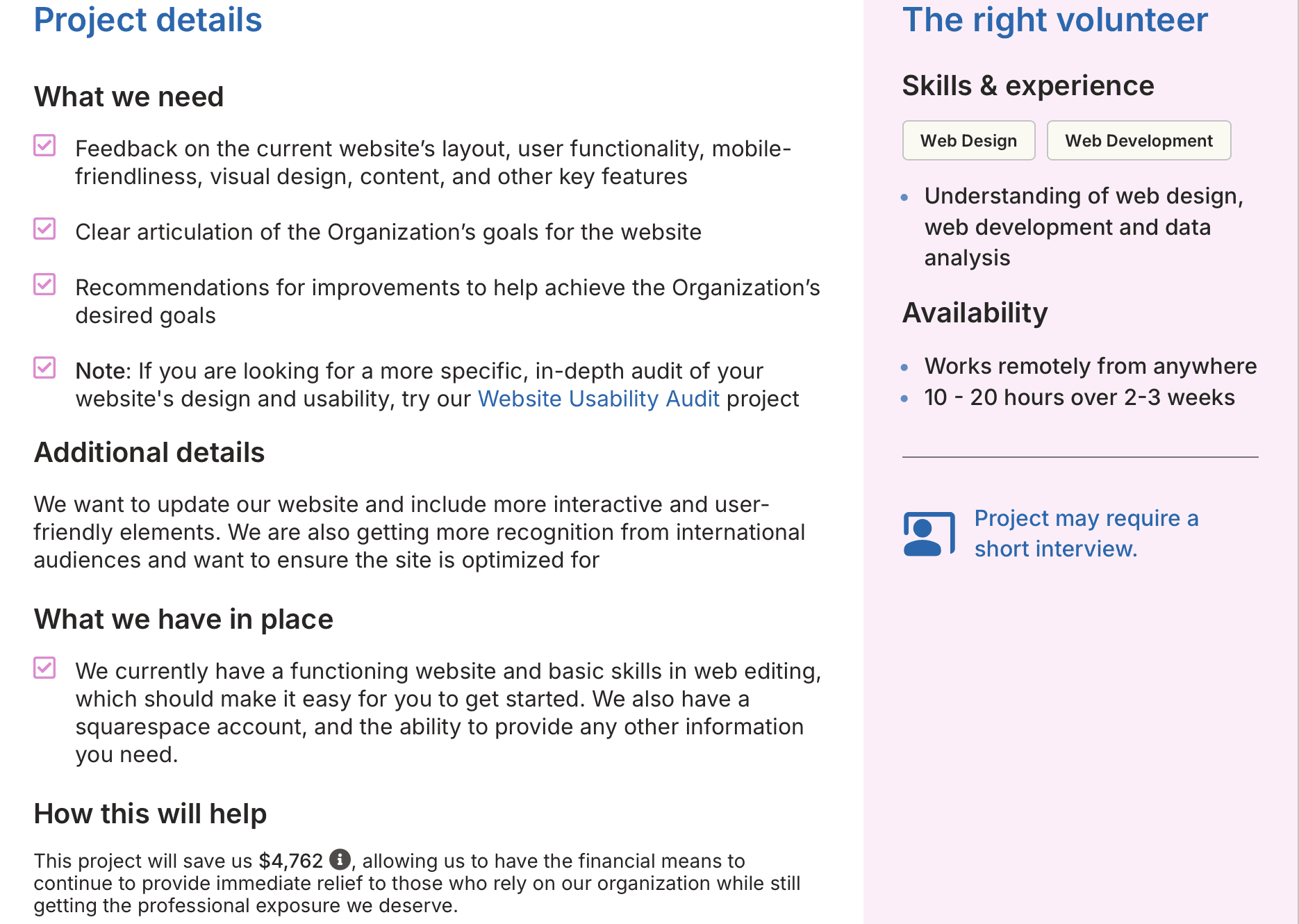
Through looking at what other volunteer organisations are doing and what we may or may not need to include.
Catchafire.org
Strengths:
•What exactly is needed is stated so the job description is very clear
•very clear about how long it will take and offer both long and short projects
•their nonprofits are “vetted & trained” as per the volunteer facing side, giving a layer of trust.
•they let you know the dollar amount of the impact your work will make can choose a particular field
Weaknesses:
•Because many projects are virtual, the platform may not fully serve nonprofits or volunteers who prefer or need in-person, local help.
•filtering for local events are not possible
•many roles are high skill causing Some volunteers report low match rates
•with many experienced professionals competing, it may be harder for some volunteers to find the right match.
Through looking at what other volunteer organisations are doing and what we may or may not need to include.
Catchafire.org
Strengths:
•What exactly is needed is stated so the job description is very clear
•very clear about how long it will take and offer both long and short projects
•their nonprofits are “vetted & trained” as per the volunteer facing side, giving a layer of trust.
•they let you know the dollar amount of the impact your work will make can choose a particular field
Weaknesses:
•Because many projects are virtual, the platform may not fully serve nonprofits or volunteers who prefer or need in-person, local help.
•filtering for local events are not possible
•many roles are high skill causing Some volunteers report low match rates
•with many experienced professionals competing, it may be harder for some volunteers to find the right match.
Through looking at what other volunteer organisations are doing and what we may or may not need to include.
Catchafire.org
Strengths:
•What exactly is needed is stated so the job description is very clear
•very clear about how long it will take and offer both long and short projects
•their nonprofits are “vetted & trained” as per the volunteer facing side, giving a layer of trust.
•they let you know the dollar amount of the impact your work will make can choose a particular field
Weaknesses:
•Because many projects are virtual, the platform may not fully serve nonprofits or volunteers who prefer or need in-person, local help.
•filtering for local events are not possible
•many roles are high skill causing Some volunteers report low match rates
•with many experienced professionals competing, it may be harder for some volunteers to find the right match.
Voluntary action harrow
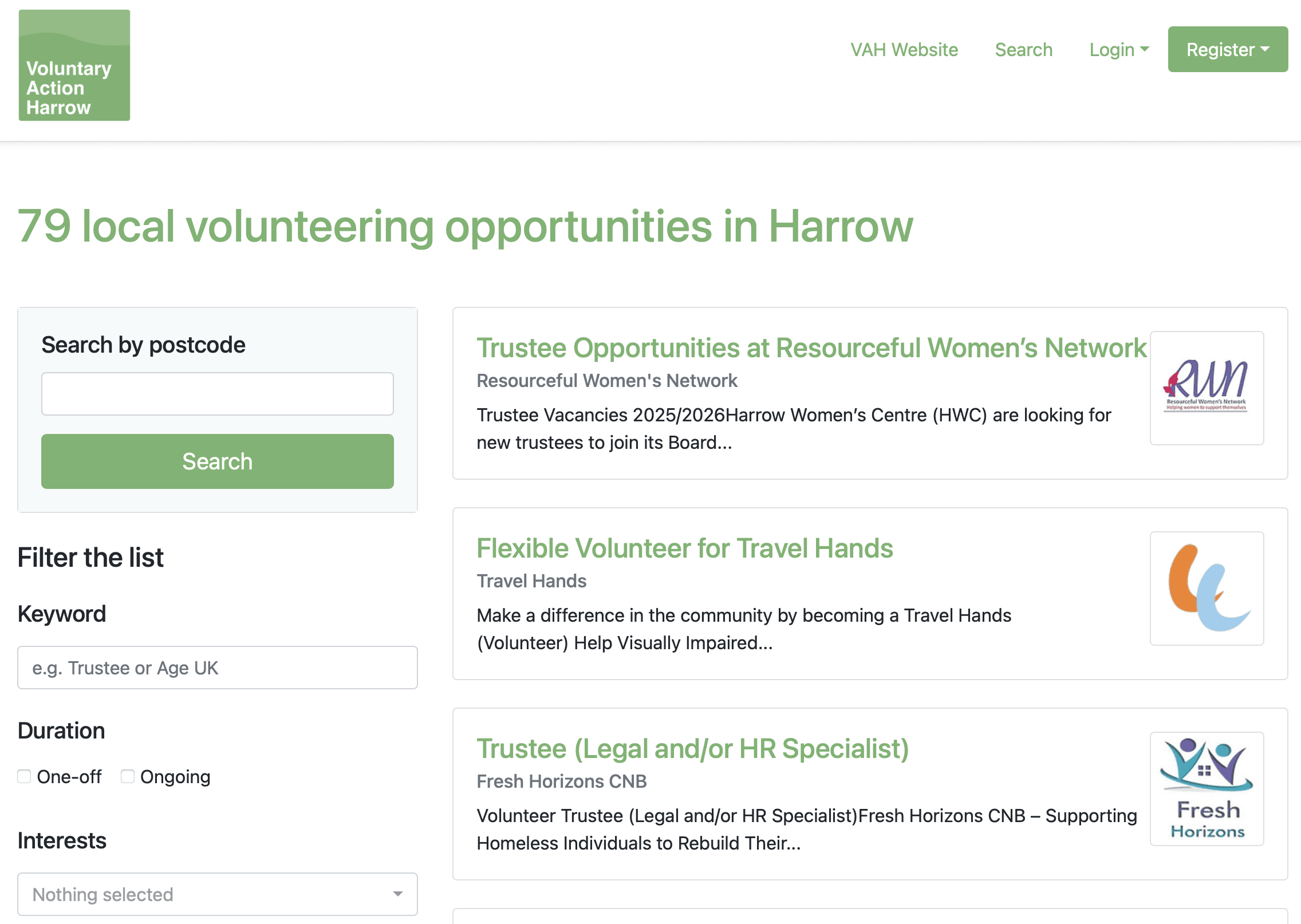
This is an organisation that one of our participants have used before and an organisation familiar to me based on its close proximity to where I stay.
Strengths:
•Serving local charities within a specific community
•They help organisations create volunteer policies, recruit, train, and retain volunteers — which can improve the quality of opportunities.
•Theres local legitimacy and community trust.
Weaknesses:
•Their operations are very local (Harrow), which is great for community focus but limits scale compared to national or global volunteering platforms.
•May not offer as many varied or high-skill “pro bono” style roles for professionals (they are more aligned to local community volunteering).
•Their success depends strongly on local engagement
Voluntary action harrow
This is an organisation that one of our participants have used before and an organisation familiar to me based on its close proximity to where I stay.
Strengths:
•Serving local charities within a specific community
•They help organisations create volunteer policies, recruit, train, and retain volunteers — which can improve the quality of opportunities.
•Theres local legitimacy and community trust.
Weaknesses:
•Their operations are very local (Harrow), which is great for community focus but limits scale compared to national or global volunteering platforms.
•May not offer as many varied or high-skill “pro bono” style roles for professionals (they are more aligned to local community volunteering).
•Their success depends strongly on local engagement
Voluntary action harrow
Strengths:
•Serving local charities within a specific community
•They help organisations create volunteer policies, recruit, train, and retain volunteers — which can improve the quality of opportunities.
•Theres local legitimacy and community trust.
Weaknesses:
•Their operations are very local (Harrow), which is great for community focus but limits scale compared to national or global volunteering platforms.
•May not offer as many varied or high-skill “pro bono” style roles for professionals (they are more aligned to local community volunteering).
•Their success depends strongly on local engagement
Card sorting
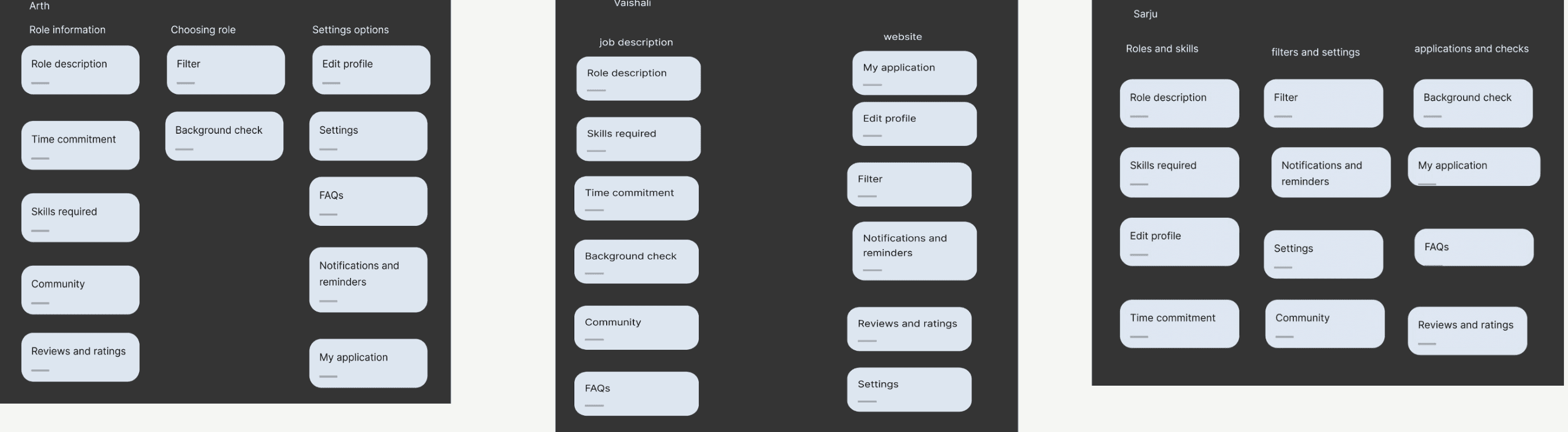
In order to see what our 3 participants mental models look like and to see how intuitive our information architecture really is, we conducted card sorting. So the 3 participants organised content into groups that make sense to them.
The first step involved taking a look at the excel provided to me. The excel presented order dates, Buyers names; emails and locations, the ticket type (live or remote), how much they paid and whether there was an additional tax on the purchase. Using this information I was able to begin designing the dashboard with the intention of showcasing this info.
Voluntary action harrow
Strengths:
•Serving local charities within a specific community
•They help organisations create volunteer policies, recruit, train, and retain volunteers — which can improve the quality of opportunities.
•Theres local legitimacy and community trust.
Weaknesses:
•Their operations are very local (Harrow), which is great for community focus but limits scale compared to national or global volunteering platforms.
•May not offer as many varied or high-skill “pro bono” style roles for professionals (they are more aligned to local community volunteering).
•Their success depends strongly on local engagement
Sitemap
Sitemap
Using all the information gathered, the sitemap of the app was created. The homepage placed at the top because it represents the main entry point and the highest level in the site’s information hierarchy.
In order to see what our 3 participants mental models look like and to see how intuitive our information architecture really is we conducted card sorting. So the 3 participants organised content into groups that make sense to them.
The dashboard was designed to meet the six requirements as mentioned earlier, therefore each feature created had each requirement in mind. Below listed are the features included.
• Key Metrics: Placed at the top for instant visibility. Includes total net sales with break-even and goal targets, plus spaces left to manage ad spend and urgency.
• Buyer Distribution Map: A world map visualisation highlights customer locations (e.g., London 90%, USA 5%), which as mentioned earlier helps marketing teams decide where to focus advertising efforts.
• Latest Orders Table: Displays recent transactions with buyer info, ticket type (color-coded), and quick action buttons for Edit, Refund, and Receipts. Designed for admins to resolve issues without switching systems.
• Weekly Sales Snapshot: Shows a summary like “3 live tickets and 2 remote tickets this week, this provides a short term trend overview without overwhelming the user. I also colour coded the tickets with the intention of an increase in recognition.
• Traffic & Filtering: You can also filter by ticket type, location, and custom date ranges. These will allow contextual comparisons, e.g., how US sales changed after a campaign.
These solutions all cover the 6 requirements listed by the owner, and as can be seen in the prototype below by clicking on the menu icon, as mentioned earlier further information in regards to traffic, finances and orders can be viewed there. Pop ups providing further info on where to go to for further info is also included as can also be seen in the prototype.
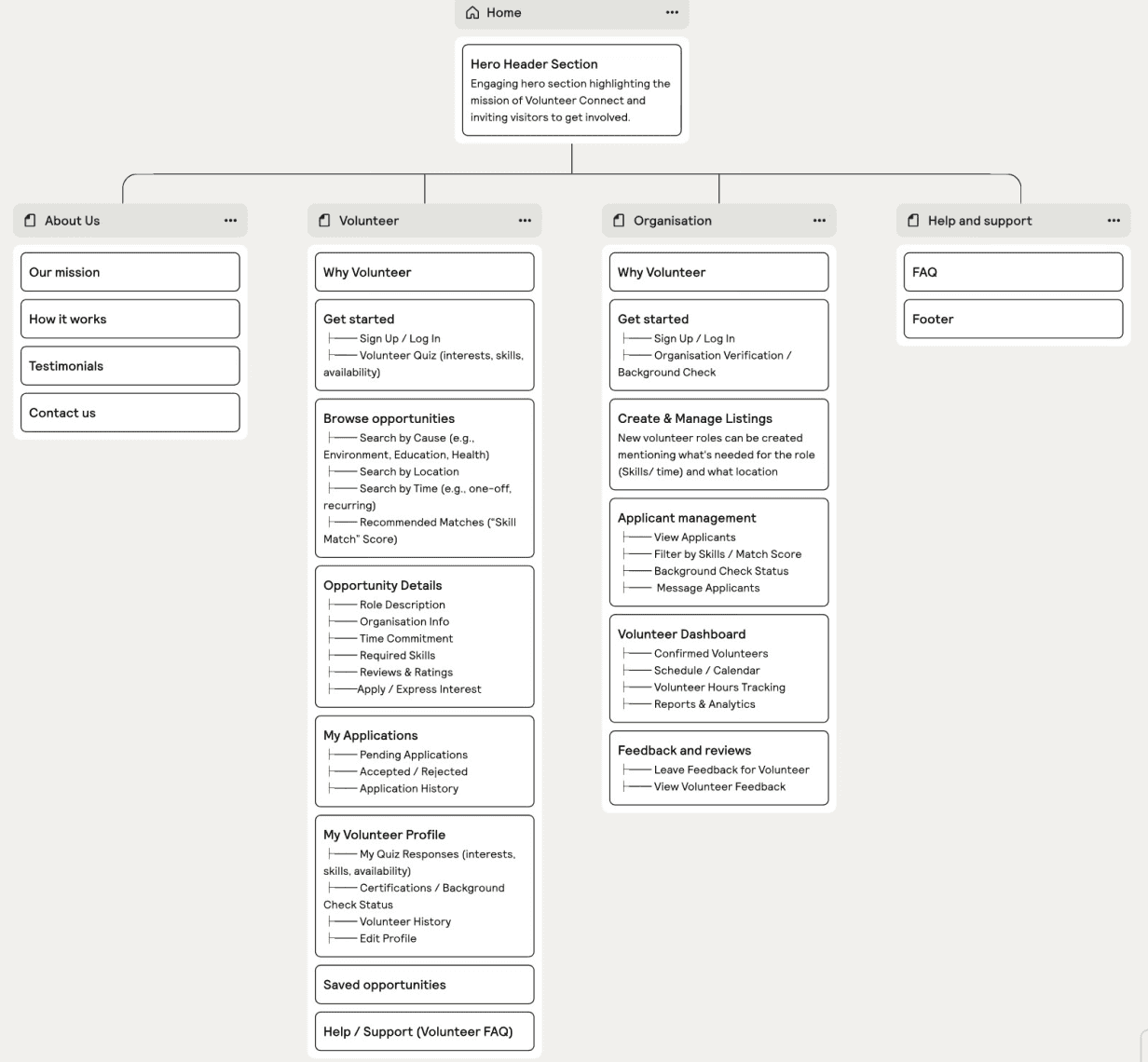
Using all the information gathered, the sitemap of the app was created. The homepage is placed at the top because it represents the main entry point and the highest level in the site’s information hierarchy.
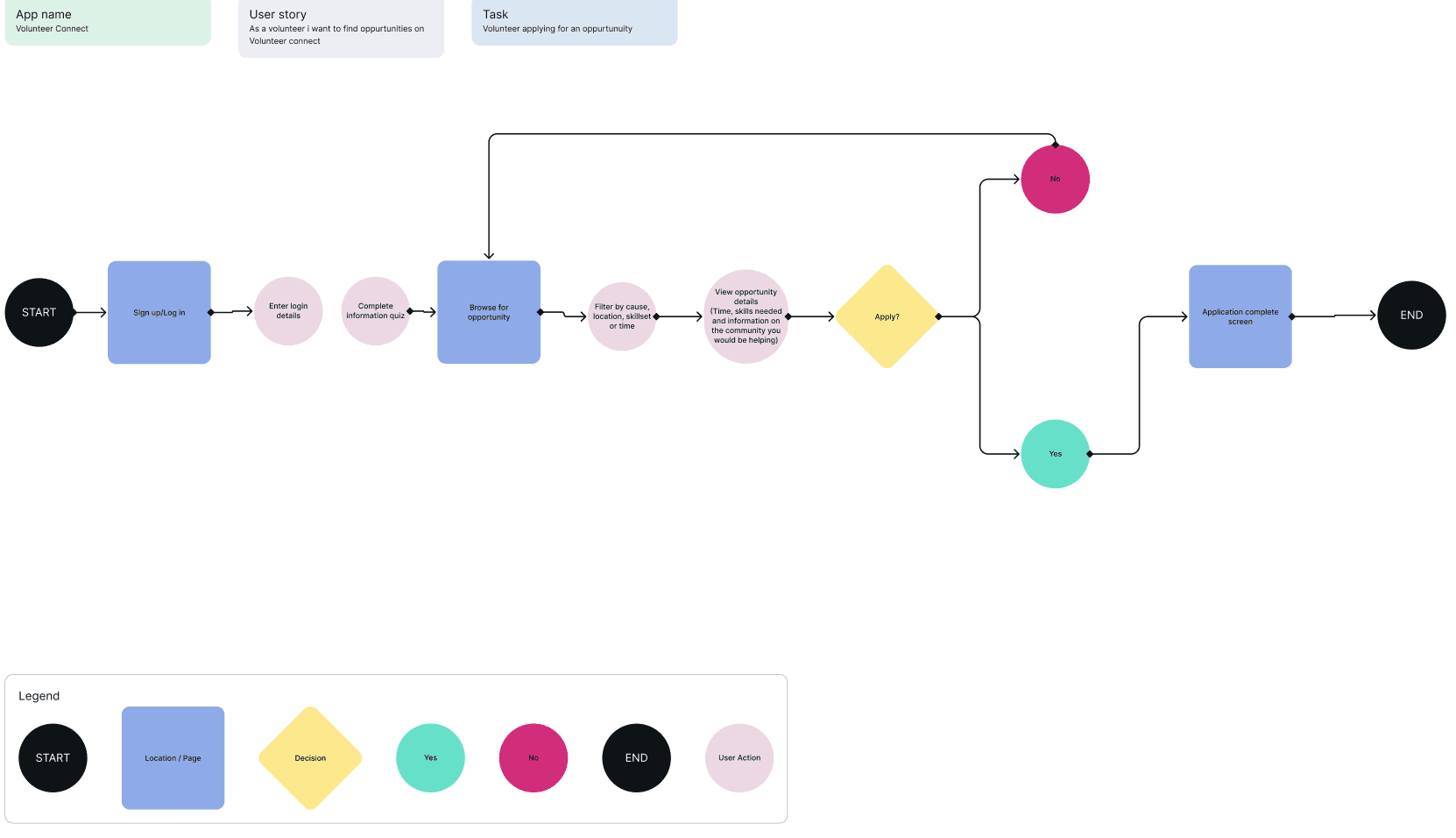
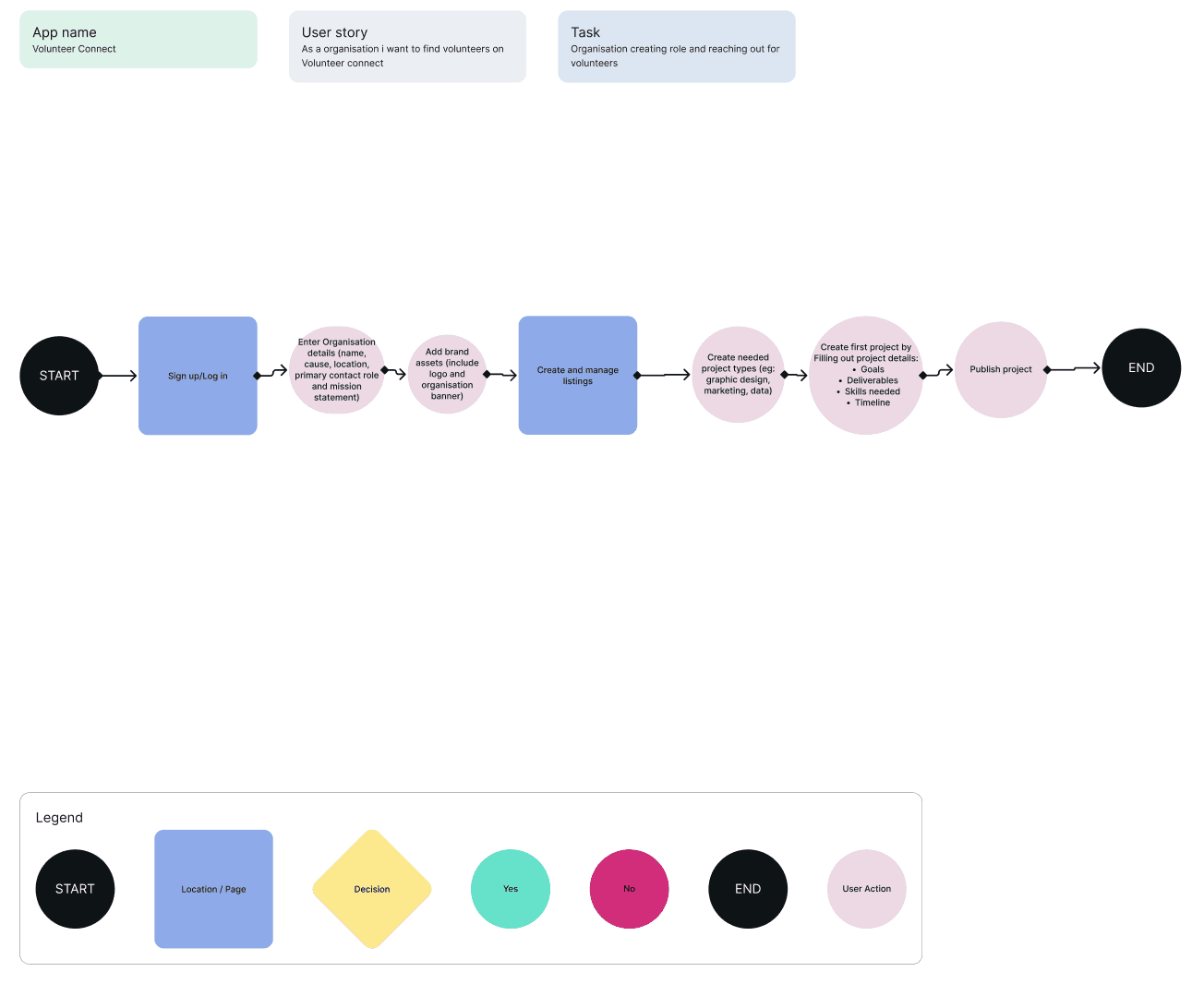
For this UX design course, the very short timeline required a focused scope, so we designed two core task flows: one for volunteers applying for a role and one for organisations listing a role. These flows were prioritised to address the most critical user journeys within the project timeframe.
Using all the information gathered, the sitemap of the app was created. The homepage is placed at the top because it represents the main entry point and the highest level in the site’s information hierarchy.
For this UX design course, the very short timeline required a focused scope, so we designed two core task flows: one for volunteers applying for a role and one for organisations listing a role. These flows were prioritised to address the most critical user journeys within the project timeframe.
The dashboard was designed to meet the six requirements as mentioned earlier, therefore each feature created had each requirement in mind. Below listed are the features included.
• Key Metrics: Placed at the top for instant visibility. Includes total net sales with break-even and goal targets, plus spaces left to manage ad spend and urgency.
• Buyer Distribution Map: A world map visualisation highlights customer locations (e.g., London 90%, USA 5%), which as mentioned earlier helps marketing teams decide where to focus advertising efforts.
• Latest Orders Table: Displays recent transactions with buyer info, ticket type (color-coded), and quick action buttons for Edit, Refund, and Receipts. Designed for admins to resolve issues without switching systems.
• Weekly Sales Snapshot: Shows a summary like “3 live tickets and 2 remote tickets this week, this provides a short term trend overview without overwhelming the user. I also colour coded the tickets with the intention of an increase in recognition.
• Traffic & Filtering: You can also filter by ticket type, location, and custom date ranges. These will allow contextual comparisons, e.g., how US sales changed after a campaign.
These solutions all cover the 6 requirements listed by the owner, and as can be seen in the prototype below by clicking on the menu icon, as mentioned earlier further information in regards to traffic, finances and orders can be viewed there. Pop ups providing further info on where to go to for further info is also included as can also be seen in the prototype.
Task flow 1
Task flow 1
The first flow is the path the volunteer would take in terms of finding a role of their choice that they feel they would be a good fit for.
The dashboard was designed to meet the six requirements as mentioned earlier, therefore each feature created had each requirement in mind. Below listed are the features included.
• Key Metrics: Placed at the top for instant visibility. Includes total net sales with break-even and goal targets, plus spaces left to manage ad spend and urgency.
• Buyer Distribution Map: A world map visualisation highlights customer locations (e.g., London 90%, USA 5%), which as mentioned earlier helps marketing teams decide where to focus advertising efforts.
• Latest Orders Table: Displays recent transactions with buyer info, ticket type (color-coded), and quick action buttons for Edit, Refund, and Receipts. Designed for admins to resolve issues without switching systems.
• Weekly Sales Snapshot: Shows a summary like “3 live tickets and 2 remote tickets this week, this provides a short term trend overview without overwhelming the user. I also colour coded the tickets with the intention of an increase in recognition.
• Traffic & Filtering: You can also filter by ticket type, location, and custom date ranges. These will allow contextual comparisons, e.g., how US sales changed after a campaign.
These solutions all cover the 6 requirements listed by the owner, and as can be seen in the prototype below by clicking on the menu icon, as mentioned earlier further information in regards to traffic, finances and orders can be viewed there. Pop ups providing further info on where to go to for further info is also included as can also be seen in the prototype.
Task flow 2
Task flow 2
This flow is the path the organisation would take in terms of creating a role volunteers could apply to.
The dashboard was designed to meet the six requirements as mentioned earlier, therefore each feature created had each requirement in mind. Below listed are the features included.
• Key Metrics: Placed at the top for instant visibility. Includes total net sales with break-even and goal targets, plus spaces left to manage ad spend and urgency.
• Buyer Distribution Map: A world map visualisation highlights customer locations (e.g., London 90%, USA 5%), which as mentioned earlier helps marketing teams decide where to focus advertising efforts.
• Latest Orders Table: Displays recent transactions with buyer info, ticket type (color-coded), and quick action buttons for Edit, Refund, and Receipts. Designed for admins to resolve issues without switching systems.
• Weekly Sales Snapshot: Shows a summary like “3 live tickets and 2 remote tickets this week, this provides a short term trend overview without overwhelming the user. I also colour coded the tickets with the intention of an increase in recognition.
• Traffic & Filtering: You can also filter by ticket type, location, and custom date ranges. These will allow contextual comparisons, e.g., how US sales changed after a campaign.
These solutions all cover the 6 requirements listed by the owner, and as can be seen in the prototype below by clicking on the menu icon, as mentioned earlier further information in regards to traffic, finances and orders can be viewed there. Pop ups providing further info on where to go to for further info is also included as can also be seen in the prototype.
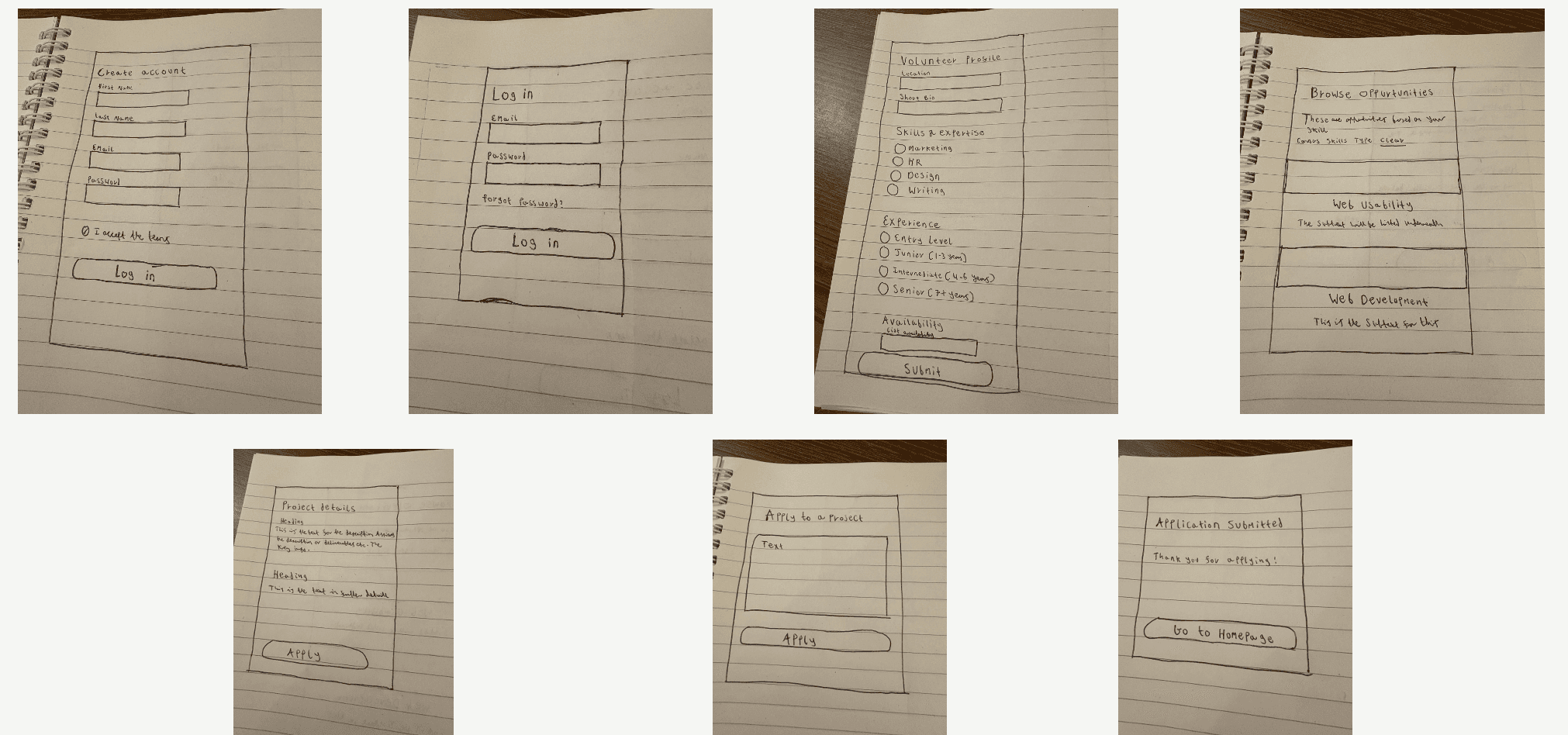
Volunteer flow sketches
Volunteer flow sketches
Upon create these flows, I created low fidelity sketches to showcase roughly what I thought this would all look like. This is a sketch of what the volunteer flow would look like.
The dashboard was designed to meet the six requirements as mentioned earlier, therefore each feature created had each requirement in mind. Below listed are the features included.
• Key Metrics: Placed at the top for instant visibility. Includes total net sales with break-even and goal targets, plus spaces left to manage ad spend and urgency.
• Buyer Distribution Map: A world map visualisation highlights customer locations (e.g., London 90%, USA 5%), which as mentioned earlier helps marketing teams decide where to focus advertising efforts.
• Latest Orders Table: Displays recent transactions with buyer info, ticket type (color-coded), and quick action buttons for Edit, Refund, and Receipts. Designed for admins to resolve issues without switching systems.
• Weekly Sales Snapshot: Shows a summary like “3 live tickets and 2 remote tickets this week, this provides a short term trend overview without overwhelming the user. I also colour coded the tickets with the intention of an increase in recognition.
• Traffic & Filtering: You can also filter by ticket type, location, and custom date ranges. These will allow contextual comparisons, e.g., how US sales changed after a campaign.
These solutions all cover the 6 requirements listed by the owner, and as can be seen in the prototype below by clicking on the menu icon, as mentioned earlier further information in regards to traffic, finances and orders can be viewed there. Pop ups providing further info on where to go to for further info is also included as can also be seen in the prototype.
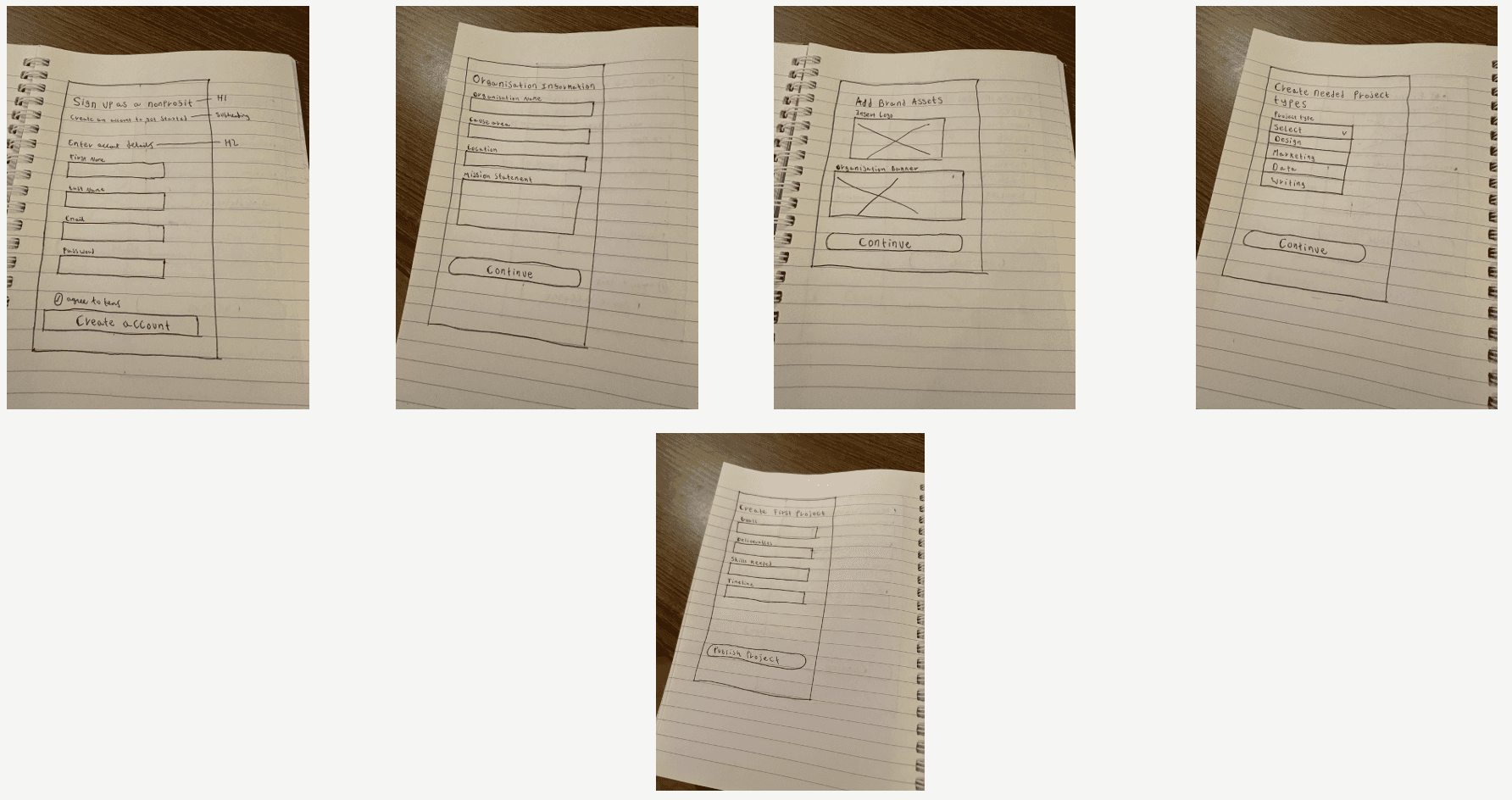
Organisation flow sketches
Organisation flow sketches
This is a sketch of what the organisation flow would look like.
The dashboard was designed to meet the six requirements as mentioned earlier, therefore each feature created had each requirement in mind. Below listed are the features included.
• Key Metrics: Placed at the top for instant visibility. Includes total net sales with break-even and goal targets, plus spaces left to manage ad spend and urgency.
• Buyer Distribution Map: A world map visualisation highlights customer locations (e.g., London 90%, USA 5%), which as mentioned earlier helps marketing teams decide where to focus advertising efforts.
• Latest Orders Table: Displays recent transactions with buyer info, ticket type (color-coded), and quick action buttons for Edit, Refund, and Receipts. Designed for admins to resolve issues without switching systems.
• Weekly Sales Snapshot: Shows a summary like “3 live tickets and 2 remote tickets this week, this provides a short term trend overview without overwhelming the user. I also colour coded the tickets with the intention of an increase in recognition.
• Traffic & Filtering: You can also filter by ticket type, location, and custom date ranges. These will allow contextual comparisons, e.g., how US sales changed after a campaign.
These solutions all cover the 6 requirements listed by the owner, and as can be seen in the prototype below by clicking on the menu icon, as mentioned earlier further information in regards to traffic, finances and orders can be viewed there. Pop ups providing further info on where to go to for further info is also included as can also be seen in the prototype.
Changes made from Sketches to Wireframing
From sketch to wireframing there were very little to no difference in terms of content, layout and structure. Despite the sketches being quick, by having a rough idea in terms of content layout and roughly what content I wish to include already in the sketch process, it became very easy to create these wireframes for both task flows.
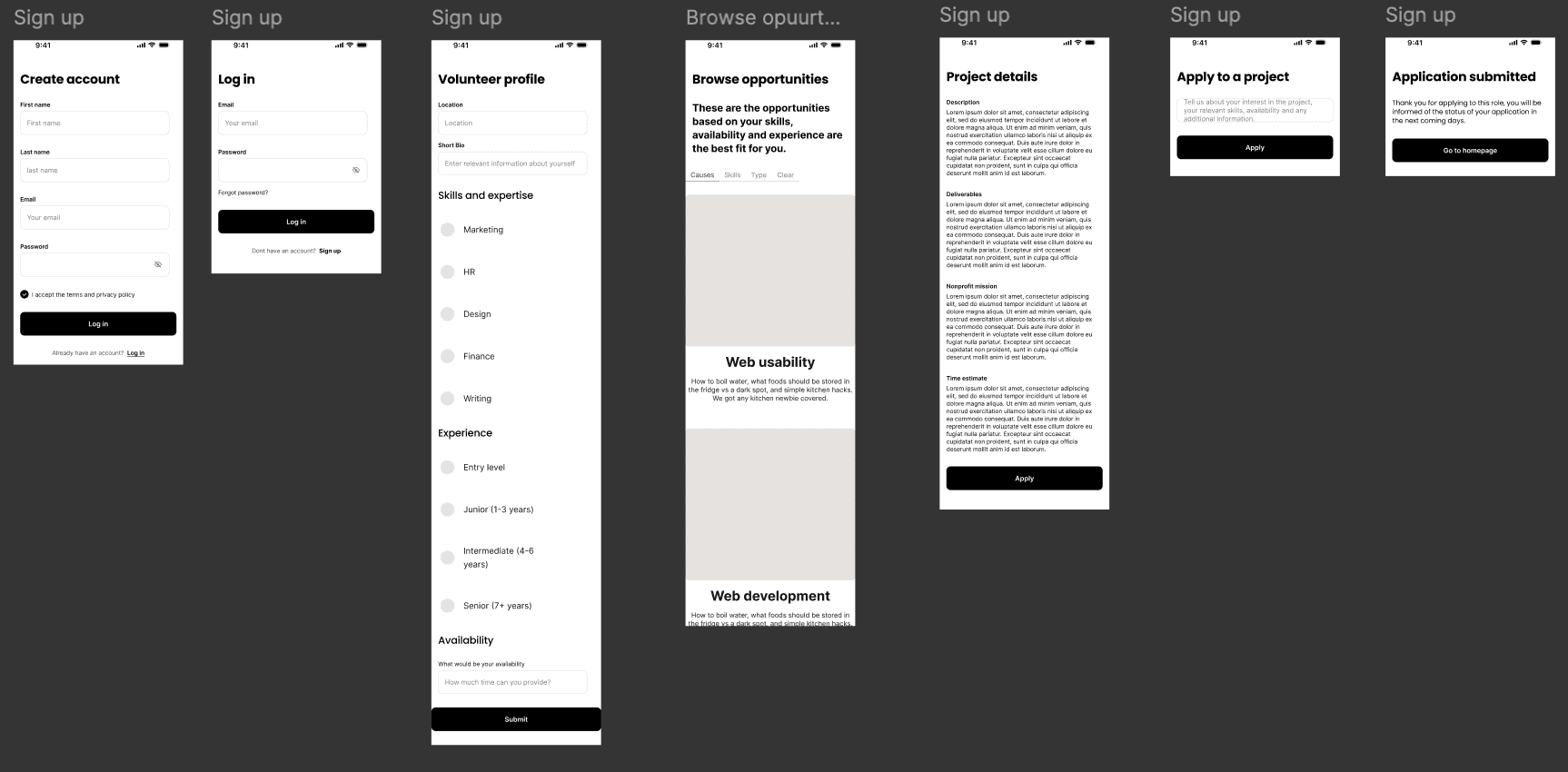
Volunteer flow mid fidelity wireframes
Volunteer flow mid fidelity wireframes
The mid fidelity flow were created to validate the core user journey before moving into high fidelity design. At this stage, the focus was on structure, clarity, and usability, rather than visual polish.
This covered the volunteers journey in finding a role on Volunteer connect.
Upon create these flows, I created low fidelity sketches to showcase roughly what I thought this would all look like. This is a sketch of what the volunteer flow would look like.
The dashboard was designed to meet the six requirements as mentioned earlier, therefore each feature created had each requirement in mind. Below listed are the features included.
• Key Metrics: Placed at the top for instant visibility. Includes total net sales with break-even and goal targets, plus spaces left to manage ad spend and urgency.
• Buyer Distribution Map: A world map visualisation highlights customer locations (e.g., London 90%, USA 5%), which as mentioned earlier helps marketing teams decide where to focus advertising efforts.
• Latest Orders Table: Displays recent transactions with buyer info, ticket type (color-coded), and quick action buttons for Edit, Refund, and Receipts. Designed for admins to resolve issues without switching systems.
• Weekly Sales Snapshot: Shows a summary like “3 live tickets and 2 remote tickets this week, this provides a short term trend overview without overwhelming the user. I also colour coded the tickets with the intention of an increase in recognition.
• Traffic & Filtering: You can also filter by ticket type, location, and custom date ranges. These will allow contextual comparisons, e.g., how US sales changed after a campaign.
These solutions all cover the 6 requirements listed by the owner, and as can be seen in the prototype below by clicking on the menu icon, as mentioned earlier further information in regards to traffic, finances and orders can be viewed there. Pop ups providing further info on where to go to for further info is also included as can also be seen in the prototype.
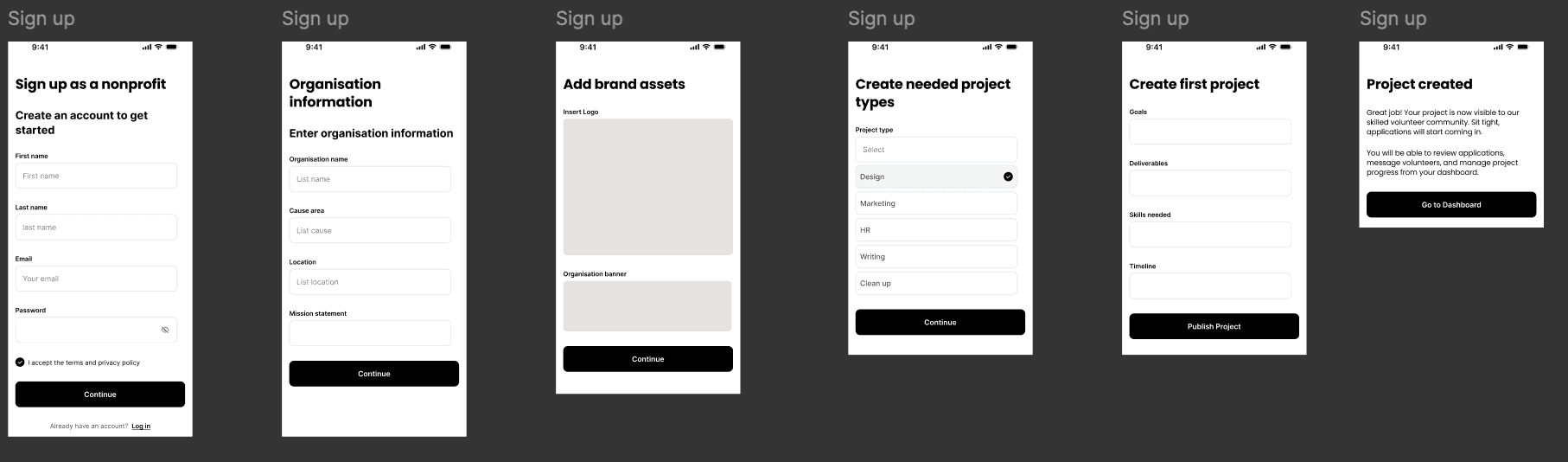
Organisation flow mid fidelity wireframes
Organisation flow mid fidelity wireframes
This covered an Organisations journey in listing a role on Volunteer connect.
The dashboard was designed to meet the six requirements as mentioned earlier, therefore each feature created had each requirement in mind. Below listed are the features included.
• Key Metrics: Placed at the top for instant visibility. Includes total net sales with break-even and goal targets, plus spaces left to manage ad spend and urgency.
• Buyer Distribution Map: A world map visualisation highlights customer locations (e.g., London 90%, USA 5%), which as mentioned earlier helps marketing teams decide where to focus advertising efforts.
• Latest Orders Table: Displays recent transactions with buyer info, ticket type (color-coded), and quick action buttons for Edit, Refund, and Receipts. Designed for admins to resolve issues without switching systems.
• Weekly Sales Snapshot: Shows a summary like “3 live tickets and 2 remote tickets this week, this provides a short term trend overview without overwhelming the user. I also colour coded the tickets with the intention of an increase in recognition.
• Traffic & Filtering: You can also filter by ticket type, location, and custom date ranges. These will allow contextual comparisons, e.g., how US sales changed after a campaign.
These solutions all cover the 6 requirements listed by the owner, and as can be seen in the prototype below by clicking on the menu icon, as mentioned earlier further information in regards to traffic, finances and orders can be viewed there. Pop ups providing further info on where to go to for further info is also included as can also be seen in the prototype.
Usability testing for mid fidelity wireframes.
Usability testing for mid fidelity wireframes.
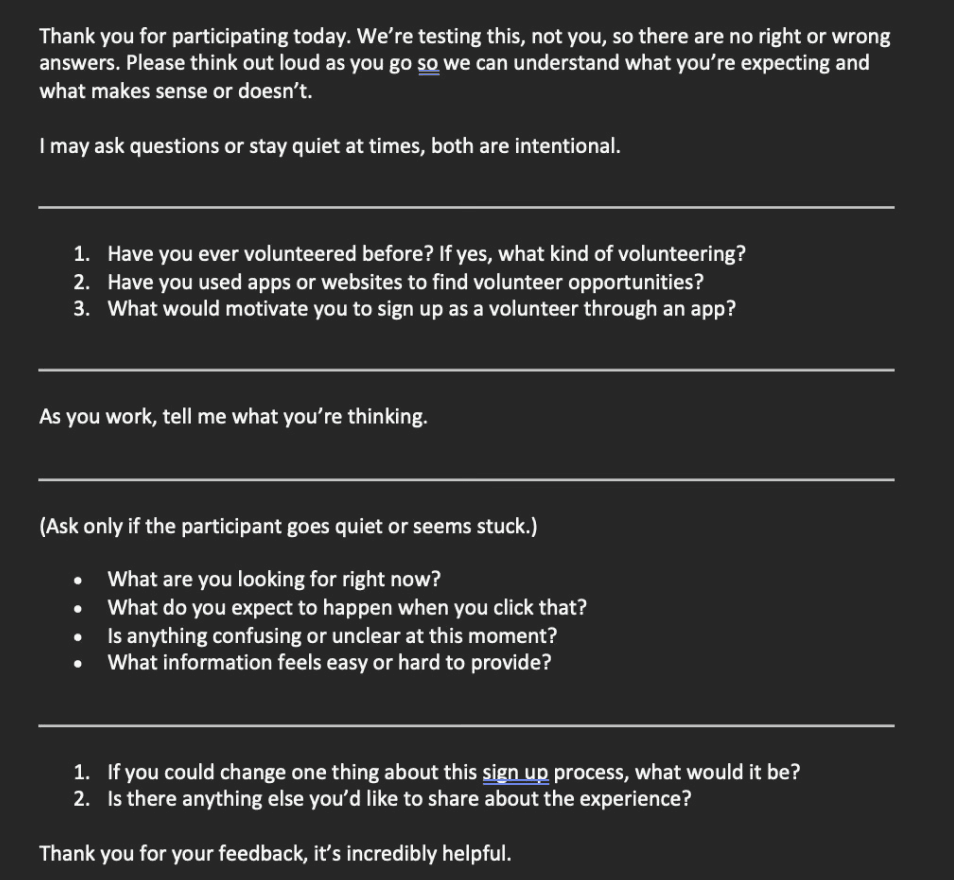
Usability testing was conducted on the mid fidelity wireframes to evaluate whether both volunteers and organisations could successfully complete their tasks on Volunteer Connect in a way that makes sense to users. This was the script used for the usability tests.
Usability testing was conducted on the mid fidelity wireframes to evaluate whether both volunteers and organisations could successfully complete their tasks on Volunteer Connect in a way that makes sense to users. This was the script used for the usability tests.
The dashboard was designed to meet the six requirements as mentioned earlier, therefore each feature created had each requirement in mind. Below listed are the features included.
• Key Metrics: Placed at the top for instant visibility. Includes total net sales with break-even and goal targets, plus spaces left to manage ad spend and urgency.
• Buyer Distribution Map: A world map visualisation highlights customer locations (e.g., London 90%, USA 5%), which as mentioned earlier helps marketing teams decide where to focus advertising efforts.
• Latest Orders Table: Displays recent transactions with buyer info, ticket type (color-coded), and quick action buttons for Edit, Refund, and Receipts. Designed for admins to resolve issues without switching systems.
• Weekly Sales Snapshot: Shows a summary like “3 live tickets and 2 remote tickets this week, this provides a short term trend overview without overwhelming the user. I also colour coded the tickets with the intention of an increase in recognition.
• Traffic & Filtering: You can also filter by ticket type, location, and custom date ranges. These will allow contextual comparisons, e.g., how US sales changed after a campaign.
These solutions all cover the 6 requirements listed by the owner, and as can be seen in the prototype below by clicking on the menu icon, as mentioned earlier further information in regards to traffic, finances and orders can be viewed there. Pop ups providing further info on where to go to for further info is also included as can also be seen in the prototype.
Mid Fidelity flow feedback
Mid Fidelity flow feedback
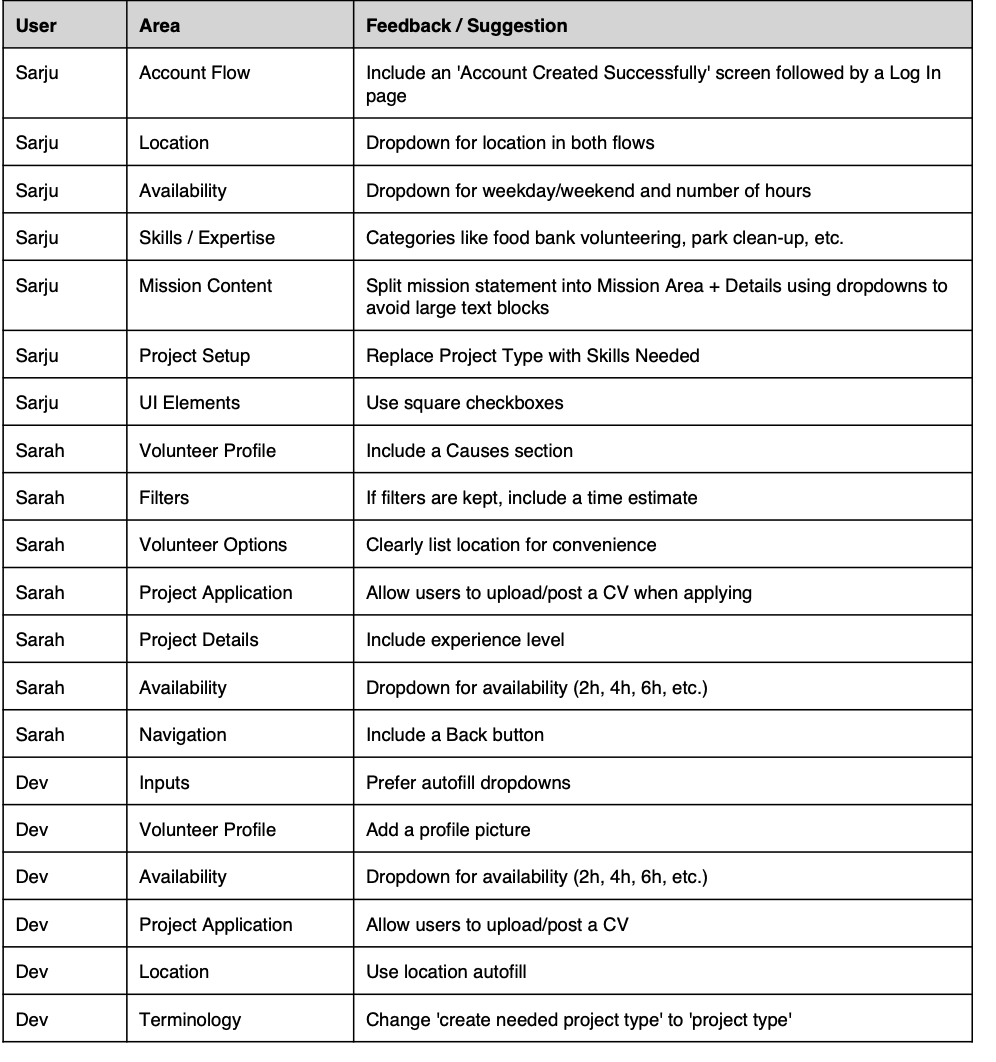
As seen in the table below, plenty of feedback was provided by all 3 participants (2 participants were ones we had not tested on earlier). This is why the process going from Mid to Hi fidelity wireframes was the process that took the longest and required the most iteration.
As seen in the table below, plenty of feedback was provided by all 3 participants (2 participants were ones we had not tested on earlier). This is why the process going from Mid to Hi fidelity wireframes was the process that took the longest and required the most iteration.
The dashboard was designed to meet the six requirements as mentioned earlier, therefore each feature created had each requirement in mind. Below listed are the features included.
• Key Metrics: Placed at the top for instant visibility. Includes total net sales with break-even and goal targets, plus spaces left to manage ad spend and urgency.
• Buyer Distribution Map: A world map visualisation highlights customer locations (e.g., London 90%, USA 5%), which as mentioned earlier helps marketing teams decide where to focus advertising efforts.
• Latest Orders Table: Displays recent transactions with buyer info, ticket type (color-coded), and quick action buttons for Edit, Refund, and Receipts. Designed for admins to resolve issues without switching systems.
• Weekly Sales Snapshot: Shows a summary like “3 live tickets and 2 remote tickets this week, this provides a short term trend overview without overwhelming the user. I also colour coded the tickets with the intention of an increase in recognition.
• Traffic & Filtering: You can also filter by ticket type, location, and custom date ranges. These will allow contextual comparisons, e.g., how US sales changed after a campaign.
These solutions all cover the 6 requirements listed by the owner, and as can be seen in the prototype below by clicking on the menu icon, as mentioned earlier further information in regards to traffic, finances and orders can be viewed there. Pop ups providing further info on where to go to for further info is also included as can also be seen in the prototype.
High Fidelity volunteer wireframes
High Fidelity volunteer wireframes
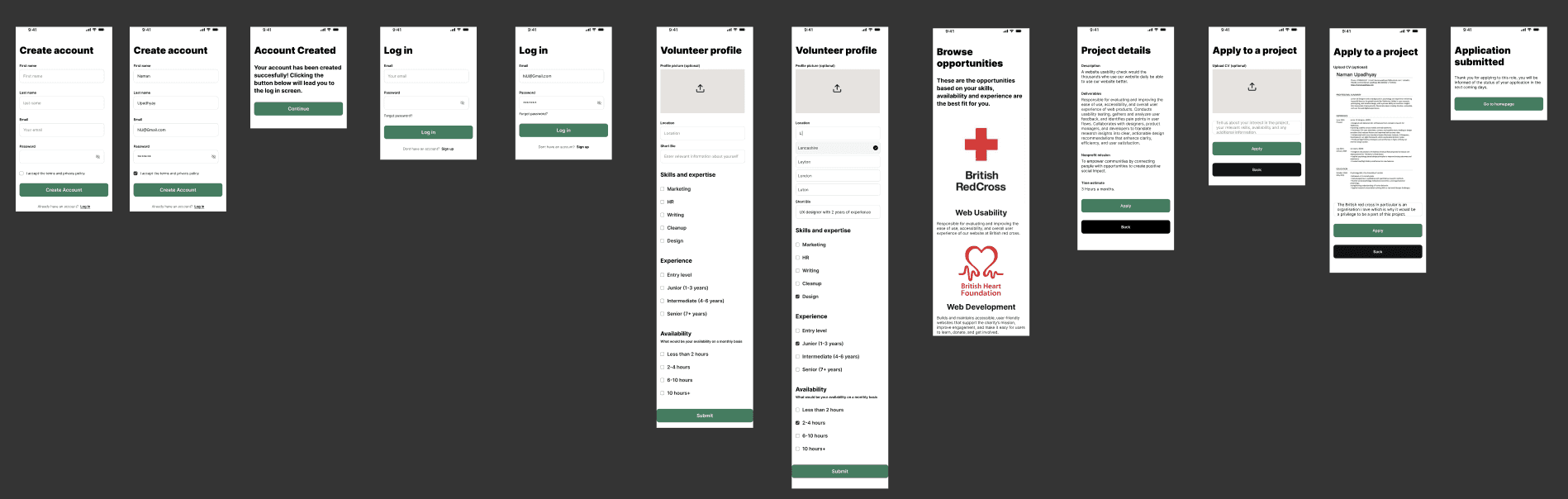
Taking into account all of the feedback given by the participants, this is what the high fidelity volunteer flow looks like.
Taking into account all of the feedback given by the participants, this is what the high fidelity volunteer flow looks like.
The dashboard was designed to meet the six requirements as mentioned earlier, therefore each feature created had each requirement in mind. Below listed are the features included.
• Key Metrics: Placed at the top for instant visibility. Includes total net sales with break-even and goal targets, plus spaces left to manage ad spend and urgency.
• Buyer Distribution Map: A world map visualisation highlights customer locations (e.g., London 90%, USA 5%), which as mentioned earlier helps marketing teams decide where to focus advertising efforts.
• Latest Orders Table: Displays recent transactions with buyer info, ticket type (color-coded), and quick action buttons for Edit, Refund, and Receipts. Designed for admins to resolve issues without switching systems.
• Weekly Sales Snapshot: Shows a summary like “3 live tickets and 2 remote tickets this week, this provides a short term trend overview without overwhelming the user. I also colour coded the tickets with the intention of an increase in recognition.
• Traffic & Filtering: You can also filter by ticket type, location, and custom date ranges. These will allow contextual comparisons, e.g., how US sales changed after a campaign.
These solutions all cover the 6 requirements listed by the owner, and as can be seen in the prototype below by clicking on the menu icon, as mentioned earlier further information in regards to traffic, finances and orders can be viewed there. Pop ups providing further info on where to go to for further info is also included as can also be seen in the prototype.
High Fidelity Organisation wireframes
High Fidelity Organisation wireframes
And this is what the high fidelity organisation flow looks like.
And this is what the high fidelity organisation flow looks like.
The dashboard was designed to meet the six requirements as mentioned earlier, therefore each feature created had each requirement in mind. Below listed are the features included.
• Key Metrics: Placed at the top for instant visibility. Includes total net sales with break-even and goal targets, plus spaces left to manage ad spend and urgency.
• Buyer Distribution Map: A world map visualisation highlights customer locations (e.g., London 90%, USA 5%), which as mentioned earlier helps marketing teams decide where to focus advertising efforts.
• Latest Orders Table: Displays recent transactions with buyer info, ticket type (color-coded), and quick action buttons for Edit, Refund, and Receipts. Designed for admins to resolve issues without switching systems.
• Weekly Sales Snapshot: Shows a summary like “3 live tickets and 2 remote tickets this week, this provides a short term trend overview without overwhelming the user. I also colour coded the tickets with the intention of an increase in recognition.
• Traffic & Filtering: You can also filter by ticket type, location, and custom date ranges. These will allow contextual comparisons, e.g., how US sales changed after a campaign.
These solutions all cover the 6 requirements listed by the owner, and as can be seen in the prototype below by clicking on the menu icon, as mentioned earlier further information in regards to traffic, finances and orders can be viewed there. Pop ups providing further info on where to go to for further info is also included as can also be seen in the prototype.

High Fidelity usability test comments
High Fidelity usability test comments
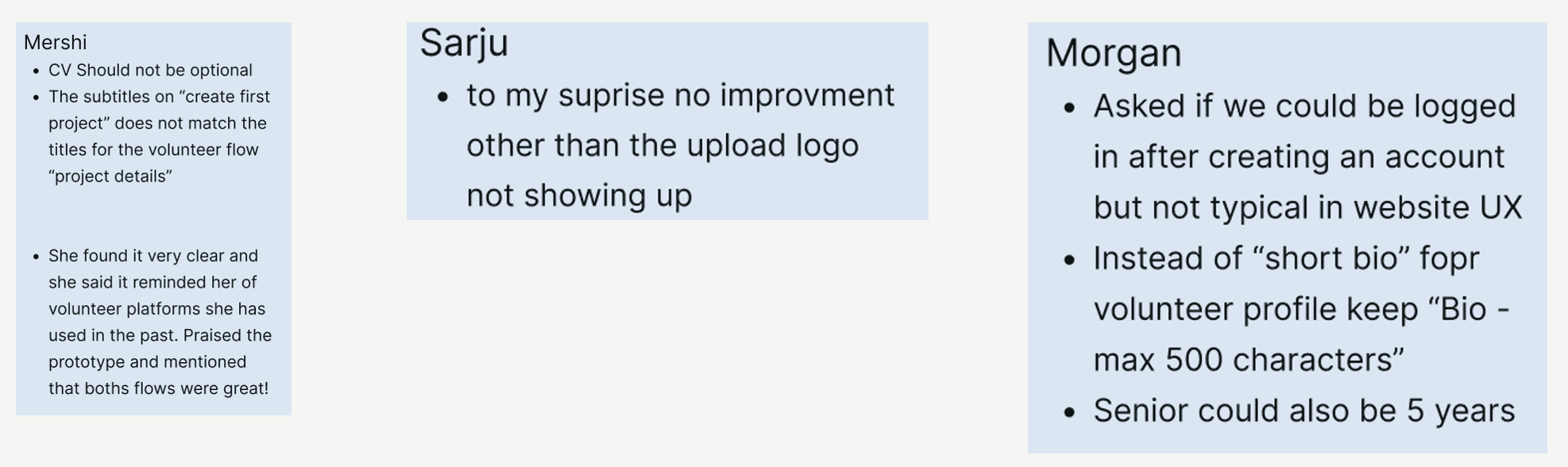
I received very little comments for improvement with these 2 flows, all 3 participants stated they found the flows very easy to use with very little difficulty. The only comment that really striked out to me was that the content for “create your first project” in the organisation flow did not line up with the "project details" screen volunteers would see when applying for a role.
Based on the sitemap I had created earlier, I also realised it may be necessary to include where the location of the opportunity would be and what other volunteers have rated a particular opportunity.
The dashboard was designed to meet the six requirements as mentioned earlier, therefore each feature created had each requirement in mind. Below listed are the features included.
• Key Metrics: Placed at the top for instant visibility. Includes total net sales with break-even and goal targets, plus spaces left to manage ad spend and urgency.
• Buyer Distribution Map: A world map visualisation highlights customer locations (e.g., London 90%, USA 5%), which as mentioned earlier helps marketing teams decide where to focus advertising efforts.
• Latest Orders Table: Displays recent transactions with buyer info, ticket type (color-coded), and quick action buttons for Edit, Refund, and Receipts. Designed for admins to resolve issues without switching systems.
• Weekly Sales Snapshot: Shows a summary like “3 live tickets and 2 remote tickets this week, this provides a short term trend overview without overwhelming the user. I also colour coded the tickets with the intention of an increase in recognition.
• Traffic & Filtering: You can also filter by ticket type, location, and custom date ranges. These will allow contextual comparisons, e.g., how US sales changed after a campaign.
These solutions all cover the 6 requirements listed by the owner, and as can be seen in the prototype below by clicking on the menu icon, as mentioned earlier further information in regards to traffic, finances and orders can be viewed there. Pop ups providing further info on where to go to for further info is also included as can also be seen in the prototype.
High Fidelity prototypes
High Fidelity prototypes
Taking into account the final feedback given, the first prototype shows the volunteer flow and the second prototype is the organisation flow.
The dashboard was designed to meet the six requirements as mentioned earlier, therefore each feature created had each requirement in mind. Below listed are the features included.
• Key Metrics: Placed at the top for instant visibility. Includes total net sales with break-even and goal targets, plus spaces left to manage ad spend and urgency.
• Buyer Distribution Map: A world map visualisation highlights customer locations (e.g., London 90%, USA 5%), which as mentioned earlier helps marketing teams decide where to focus advertising efforts.
• Latest Orders Table: Displays recent transactions with buyer info, ticket type (color-coded), and quick action buttons for Edit, Refund, and Receipts. Designed for admins to resolve issues without switching systems.
• Weekly Sales Snapshot: Shows a summary like “3 live tickets and 2 remote tickets this week, this provides a short term trend overview without overwhelming the user. I also colour coded the tickets with the intention of an increase in recognition.
• Traffic & Filtering: You can also filter by ticket type, location, and custom date ranges. These will allow contextual comparisons, e.g., how US sales changed after a campaign.
These solutions all cover the 6 requirements listed by the owner, and as can be seen in the prototype below by clicking on the menu icon, as mentioned earlier further information in regards to traffic, finances and orders can be viewed there. Pop ups providing further info on where to go to for further info is also included as can also be seen in the prototype.
Further improvements
Further improvements
This case study was then presented to members of the Brainstation community, and the feedback I recieved really let me know that this case study and the wireframes involved with it were exceptional. Overall I received a lot of praise for this as I covered everything within the design process and came up with a user centred solution. The only feedback I received was that the wireframes could have more brand identity, the inclusion of a logo could really add more brand identity in regards to "Volunteer Connect".
The dashboard was designed to meet the six requirements as mentioned earlier, therefore each feature created had each requirement in mind. Below listed are the features included.
• Key Metrics: Placed at the top for instant visibility. Includes total net sales with break-even and goal targets, plus spaces left to manage ad spend and urgency.
• Buyer Distribution Map: A world map visualisation highlights customer locations (e.g., London 90%, USA 5%), which as mentioned earlier helps marketing teams decide where to focus advertising efforts.
• Latest Orders Table: Displays recent transactions with buyer info, ticket type (color-coded), and quick action buttons for Edit, Refund, and Receipts. Designed for admins to resolve issues without switching systems.
• Weekly Sales Snapshot: Shows a summary like “3 live tickets and 2 remote tickets this week, this provides a short term trend overview without overwhelming the user. I also colour coded the tickets with the intention of an increase in recognition.
• Traffic & Filtering: You can also filter by ticket type, location, and custom date ranges. These will allow contextual comparisons, e.g., how US sales changed after a campaign.
These solutions all cover the 6 requirements listed by the owner, and as can be seen in the prototype below by clicking on the menu icon, as mentioned earlier further information in regards to traffic, finances and orders can be viewed there. Pop ups providing further info on where to go to for further info is also included as can also be seen in the prototype.