
Designing an Inclusive Ordering & Payment Experience
Type: Interview design challenge
Role: Product Designer
Timeline: 2 days
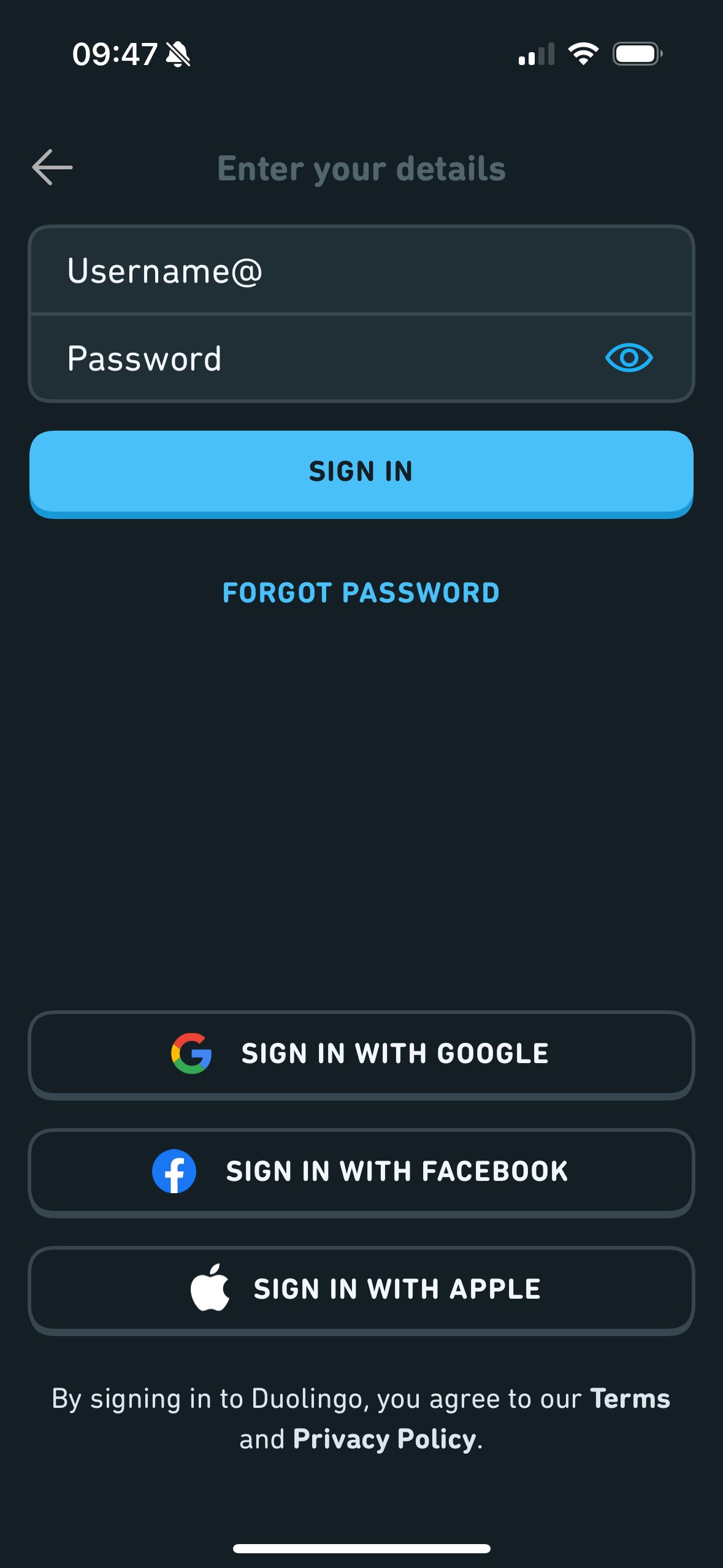
About the Project: The purpose of this is to determine if when a user is entering their password should the eye icon be closed if the password is masked or open.
My role: UX/UI Designer and UX Researcher
Duration: 5 days
My Responsibilities: Conducting UX research, creating wireframes and prototyping.
Overview
This was an Interview design challenge set by a product design consultancy, asking me to take on the role of a Product Design Consultant for a fictional client scenario. The client was a charity that partners with restaurants to employ people with learning difficulties in the hospitality industry.
The core problem was that wait staff, who take drinks orders and deliver them to tables, faced significant barriers like poor eyesight, reduced cognitive ability, and limited reading skills. Research indicated they respond better to symbols and simple images than text, and prefer to avoid direct customer interaction, making payment handling particularly difficult.
The brief asked me to explore digitising the ordering and payments process, with the goal of running an 8–12 week Proof of Concept to test the idea and secure restaurant buy in for a wider rollout.
Deliverables requested:
A proposed design approach for solving the problem
An explanation of how users and stakeholders would be involved in the process
Visual artefacts such as journey maps and user flows
One hi fidelity screen of the proposed solution
Assumptions were permitted in place of primary research, and the emphasis was on presentation and communication of design thinking rather than pixel perfect execution.
This was an Interview design challenge set by a product design consultancy, asking me to take on the role of a Product Design Consultant for a fictional client scenario. The client was a charity that partners with restaurants to employ people with learning difficulties in the hospitality industry.
The core problem was that wait staff, who take drinks orders and deliver them to tables, faced significant barriers like poor eyesight, reduced cognitive ability, and limited reading skills. Research indicated they respond better to symbols and simple images than text, and prefer to avoid direct customer interaction, making payment handling particularly difficult.
The brief asked me to explore digitising the ordering and payments process, with the goal of running an 8–12 week Proof of Concept to test the idea and secure restaurant buy in for a wider rollout.
Deliverables requested:
A proposed design approach for solving the problem
An explanation of how users and stakeholders would be involved in the process
Visual artefacts such as journey maps and user flows
One hi fidelity screen of the proposed solution
Assumptions were permitted in place of primary research, and the emphasis was on presentation and communication of design thinking rather than pixel perfect execution.
This was an Interview design challenge set by a product design consultancy, asking me to take on the role of a Product Design Consultant for a fictional client scenario. The client was a charity that partners with restaurants to employ people with learning difficulties in the hospitality industry.
The core problem was that wait staff, who take drinks orders and deliver them to tables, faced significant barriers like poor eyesight, reduced cognitive ability, and limited reading skills. Research indicated they respond better to symbols and simple images than text, and prefer to avoid direct customer interaction, making payment handling particularly difficult.
The brief asked me to explore digitising the ordering and payments process, with the goal of running an 8–12 week Proof of Concept to test the idea and secure restaurant buy in for a wider rollout.
Deliverables requested:
A proposed design approach for solving the problem
An explanation of how users and stakeholders would be involved in the process
Visual artefacts such as journey maps and user flows
One hi fidelity screen of the proposed solution
Assumptions were permitted in place of primary research, and the emphasis was on presentation and communication of design thinking rather than pixel perfect execution.
Problem statement
The challenge was to digitise ordering and payments while removing barriers for wait staff with learning difficulties, people who respond better to symbols and imagery than complex text, and who prefer to avoid direct customer interaction. The design aims to meet WCAG 2.1 and Section 508 standards, ensuring accessibility for customers and wait staff with visual, cognitive, and motor impairments.
This meant designing for two user groups simultaneously:
Customers needed a frictionless self serve ordering experience as the Wait staff prefer to avoid interacting with customers and as such, struggle to take payments from customers
Wait staff needed to understand what to deliver, and to whom, with as little friction as possible
The challenge was to digitise ordering and payments while removing barriers for wait staff with learning difficulties — people who respond better to symbols and imagery than complex text, and who prefer to avoid direct customer interaction.
This meant designing for two user groups simultaneously:
Customers needed a frictionless self-serve ordering experience
Wait staff needed to understand what to deliver, and to whom, with as little friction as possible
The challenge was to digitise ordering and payments while removing barriers for wait staff with learning difficulties — people who respond better to symbols and imagery than complex text, and who prefer to avoid direct customer interaction.
This meant designing for two user groups simultaneously:
Customers needed a frictionless self-serve ordering experience
Wait staff needed to understand what to deliver, and to whom, with as little friction as possible
Design concept
Rather than designing a single solution, I reframed the role of the wait staff entirely from "order taker" to "order deliverer". This removed the parts of the job that caused the most friction (taking orders, handling payments) and leaned into what staff were already comfortable doing.
Customer flow: Customers scan a QR code at their table and order directly from their phone, or request a tablet. They choose drinks, customise their order, and pay themselves, no staff interaction required.
Wait staff flow: Staff receive orders via a notification on a tablet. The order information screen uses drink images, colour coding, and table numbers to communicate what needs to be done clearly and at a glance. Scanability was the core design principle.
Rather than designing a single solution, I reframed the role of the wait staff entirely from "order taker" to "order deliverer". This removed the parts of the job that caused the most friction (taking orders, handling payments) and leaned into what staff were already comfortable doing.
Customer flow: Customers scan a QR code at their table and order directly from their phone, or request a tablet. They choose drinks, customise their order, and pay themselves, no staff interaction required.
Wait staff flow: Staff receive orders via a notification on a tablet. The order information screen uses drink images, colour coding, and table numbers to communicate what needs to be done clearly and at a glance. Scanability was the core design principle.
Rather than designing a single solution, I reframed the role of the wait staff entirely from "order taker" to "order deliverer". This removed the parts of the job that caused the most friction (taking orders, handling payments) and leaned into what staff were already comfortable doing.
Customer flow: Customers scan a QR code at their table and order directly from their phone, or request a tablet. They choose drinks, customise their order, and pay themselves, no staff interaction required.
Wait staff flow: Staff receive orders via a notification on a tablet. The order information screen uses drink images, colour coding, and table numbers to communicate what needs to be done clearly and at a glance. Scanability was the core design principle.
User & Stakeholder Involvement
•Wait staff: Show 4–5 image options per drink type, laid out on a table. Ask staff to identify specific drinks (e.g. Estrella vs Asahi) by pointing. Record which images are understood immediately and which cause hesitation.
•Customers: Before launch, hand a prototype to a friend or family member and ask them to order a drink without guidance. Any point they need help is a usability issue worth addressing.
•Restaurant managers: Sit with the manager to map their drinks menu against the image library, flag gaps, and confirm whether providing ordering tablets or phones at tables is operationally feasible.
•Charity: Regular check ins throughout the process to track progress against goals. Making changes early is far cheaper than making them late.
•In order to see what users thought was the right way the password icon should be seen; I asked 10 friends and family members 3 questions below. I asked people across different age groups to take part to prevent an uneven distribution on age (6 were 18-25, 3 were 26-35 and one was 35+).
• The results showed 60% of participants thought the eye icon should be open when the password is unmasked while 40% thought it should be closed. This means more participants felt the eye icon should be seen as a status.
•In order to see what users thought was the right way the password icon should be seen; I asked 10 friends and family members 3 questions below. I asked people across different age groups to take part to prevent an uneven distribution on age (6 were 18-25, 3 were 26-35 and one was 35+).
• The results showed 60% of participants thought the eye icon should be open when the password is unmasked while 40% thought it should be closed. This means more participants felt the eye icon should be seen as a status.
10 Week Proof of concept Timeline
•Weeks 1–2: Discovery
Speak with the charity and restaurant manager about concerns and success criteria. Run image testing with wait staff to identify which drink images are clear and which cause confusion as mentioned earlier. Begin categorising drinks into digital groups.
•Weeks 3–5: Prototype & Internal Testing
Build a working prototype, real enough to test but simple enough to change quickly. Run internal ordering tests end to end. Address edge cases, such as customers who refuse to order digitally.
•Weeks 6–8: Live Testing
Go live with real customers. Document what worked, what didn't, and what needs to change for full rollout. Weekly charity check ins continue.
•Weeks 9–10: Iteration & Deployment
Incorporate feedback from weeks 6–8 and move to a smoother, more confident deployment.
Customer and staff journey
Customer Journey:
•The results show that 80% of participants felt that the eye icon should be closed when masked. So based on both tests it seems that users see the eye icon as a status instead of a CTA, meaning for our password fields the eye icon should be closed when the password is masked and open when the password is unmasked as our initial hypothesis suggested.

Staff Journey:
•The results show that 80% of participants felt that the eye icon should be closed when masked. So based on both tests it seems that users see the eye icon as a status instead of a CTA, meaning for our password fields the eye icon should be closed when the password is masked and open when the password is unmasked as our initial hypothesis suggested.

Order information screen
The Order information screen design (listed at the very top) was very intentional with reasons for every design decision I made.
Colour coded information to support those with cognitive and visual impairments. Blue was chosen for alert banners, consistent with iOS, Google Material, and GOV.UK design systems
Green CTA to signal a positive, confirmatory action ( While WCAG 2.1 SC 1.4.1 — Use of Colour says you cannot rely on colour alone to convey information or meaning, the fact it is labelled clearly, adds to it being furthermore accessible)
Images alongside each item so staff can visually match what to pick up without needing to read. The text next to the image is very valuable as (WCAG 2.1 SC 1.1.1 — Non text content ): images should have a text equivalent, in this case the item name next to each image serves this purpose. It also supports staff with cognitive impairments who process visuals faster than text.
Inter typeface for its legibility and accessibility and remains readable for users with colour blindness. it scales well at larger sizes without becoming illegible or distorted. (WCAG 2.1 SC 1.4.4 — Resize text): Text can be resized without breaking the layout, and the font itself is legible at any size.
Capitalised key information to improve scanability for users with cognitive impairments. (WCAG 2.1 SC 1.3.3 — Low reliance on sensory properties): Users with cognitive or attention related impairments aren't overwhelmed, the screen tells them exactly what matters and what to do next.
Intentionally literal, transparent copy as plain, clear language helps wait staff with cognitive impairments, dyslexia, or low literacy process information quickly without ambiguity. (WCAG 2.1 SC 3.1.5 — Readable): don't make people work that hard. Keep it simple, or give them a way to access the same information more easily.
Neutral palette excluding banners and CTAs, to reduce visual fatigue. (WCAG 2.1 SC 1.4.1 & 1.4.3 — Colour and Contrast): Someone who is colour blind or has low vision can still read and understand the screen. The information isn't hidden behind colour alone, and text is dark enough to read clearly.
The Order information screen design (listed at the very top) was very intentional with reasons for every design decision I made.
Colour coded information to support those with cognitive and visual impairments. Blue was chosen for alert banners, consistent with iOS, Google Material, and GOV.UK design systems
Green CTA to signal a positive, confirmatory action ( While WCAG 2.1 SC 1.4.1 — Use of Colour says you cannot rely on colour alone to convey information or meaning, the fact it is labelled clearly, adds to it being furthermore accessible)
Images alongside each item so staff can visually match what to pick up without needing to read. The text next to the image is very valuable as (WCAG 2.1 SC 1.1.1 — Non text content ): images should have a text equivalent, in this case the item name next to each image serves this purpose. It also supports staff with cognitive impairments who process visuals faster than text.
Inter typeface for its legibility and accessibility and remains readable for users with colour blindness. it scales well at larger sizes without becoming illegible or distorted. (WCAG 2.1 SC 1.4.4 — Resize text): Text can be resized without breaking the layout, and the font itself is legible at any size.
Capitalised key information to improve scanability for users with cognitive impairments. (WCAG 2.1 SC 1.3.3 — Low reliance on sensory properties): Users with cognitive or attention related impairments aren't overwhelmed, the screen tells them exactly what matters and what to do next.
Intentionally literal, transparent copy as plain, clear language helps wait staff with cognitive impairments, dyslexia, or low literacy process information quickly without ambiguity. (WCAG 2.1 SC 3.1.5 — Readable): don't make people work that hard. Keep it simple, or give them a way to access the same information more easily.
Neutral palette excluding banners and CTAs, to reduce visual fatigue. (WCAG 2.1 SC 1.4.1 & 1.4.3 — Colour and Contrast): Someone who is colour blind or has low vision can still read and understand the screen. The information isn't hidden behind colour alone, and text is dark enough to read clearly.
•The results show that 80% of participants felt that the eye icon should be closed when masked. So based on both tests it seems that users see the eye icon as a status instead of a CTA, meaning for our password fields the eye icon should be closed when the password is masked and open when the password is unmasked as our initial hypothesis suggested.
Outcomes
Through this process I
Designed a high fidelity interface accessible to wait staff with cognitive and visual impairments
Defined a clear end to end customer ordering journey requiring no staff interaction
Mapped a realistic 10 week PoC timeline with defined milestones
Proposed lightweight, low cost methods to involve users and stakeholders at each stage
Reframed the staff role in a way that reduces friction without requiring behavioural change
•The results show that 80% of participants felt that the eye icon should be closed when masked. So based on both tests it seems that users see the eye icon as a status instead of a CTA, meaning for our password fields the eye icon should be closed when the password is masked and open when the password is unmasked as our initial hypothesis suggested.